Overview
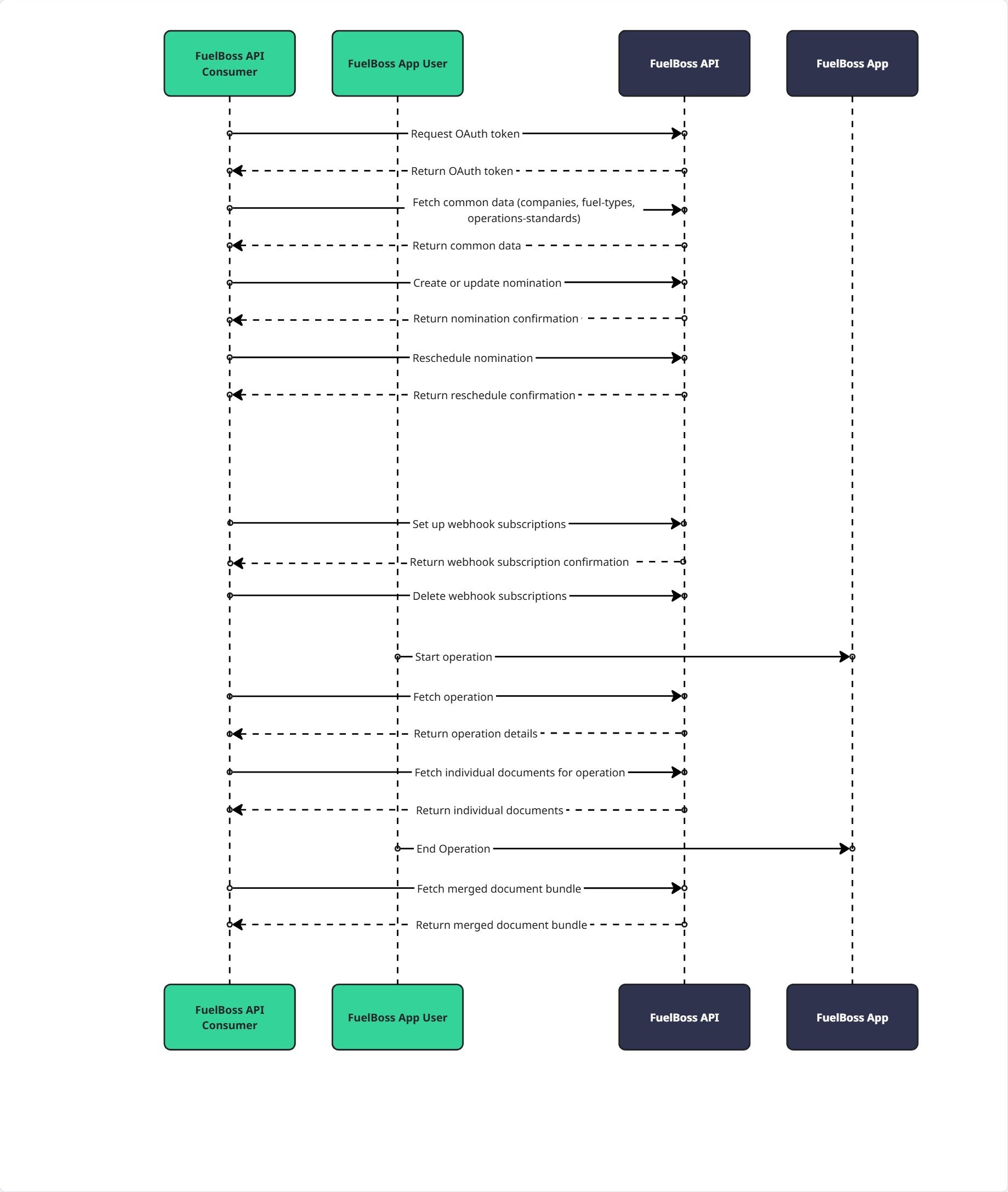
The FuelBoss API provides secure access to your company’s operational data including nominations, operations, documents and webhooks for real-time notifications. This RESTful API is designed for enterprise integration and follows industry-standard security practices.API integration flow
The diagram below illustrates a typical integration sequence showing how your system authenticates, creates nominations, monitors operations, retrieves documents, and receives real-time updates via webhooks:
Environments
The FuelBoss API is available in the following environments:- Production: https://api.fuelboss.net - Live environment with real operational data
- Demo: https://api.demo.fuelboss.net - Sandbox environment for testing and integration development
/swagger/index.html for each environment to explore endpoints and view schemas.
Contact itops@ofiniti.com for environment access and credentials.
Authentication
The FuelBoss API uses OAuth 2.0 Client Credentials Grant for API authentication. This flow is designed for server-to-server communication where your system authenticates directly with our API.Getting access credentials
Contact FuelBoss itops@ofiniti.com to receive your:client_id- Unique identifier for your companyclient_secret- Secret key for authentication (keep secure)
Token request
Endpoint:POST /oauth/token
Request Headers:
Using the access token
Include the access token in all API requests: Request Headers:- Validity: 60 minutes (3600 seconds)
- Renewal: Request new token before expiration
- Scope: Automatically limited to your company’s data
Conventions
All endpoints return JSON and require a valid access token unless otherwise specified.This guide covers concepts and workflows. The API reference section of this tab documents every endpoint’s request and response schema — including field-level descriptions and enumeration values — and includes an interactive playground.
Date and time formats
All dates and times sent to the API must be in ISO 8601 format with an explicit UTC offset — a numeric offset such as+08:00 or -04:00, or Z for UTC:
2026-07-06T14:00:00 or 2026-07-06) are rejected with 400 Bad Request.
Unless suffixed with Utc, dates and times returned by the API are expressed in the local time zone of the bunkering port, with the port’s UTC offset included (e.g. 2026-07-06T14:00:00+02:00 for a port in CEST). Fields suffixed with Utc (e.g. lastChangedAtUtc) are always returned in UTC.
Nominations
Nominations represent requests for bunkering operations. You identify a nomination by itsclientReference — your unique identifier, at most 100 characters, alphanumeric and hyphens only (a-z, A-Z, 0-9, -) — and the create-or-update endpoints are idempotent on it. All timestamps you send must include an explicit UTC offset — see Date and time formats.
Create and update nominations through the endpoint matching your role: as a supplier (PUT /v1/nominations/supplier) or as a receiver (PUT /v1/nominations/receiver). As a receiver, your authenticated company is used as the receiver — the receiver section has no companyIdentifier — and you identify the supplier with supplierCompanyIdentifier; supplierCompanyEntityReference is only applied for loading operations where the receiver and supplier are the same company and is ignored otherwise. Field-level semantics for every request and response body are documented on the corresponding API reference page.
Draft nominations are lightweight, in-progress nominations: when creating or updating a draft (PUT /v1/nominations/drafts), only operationStandardCode, laycanStart, and laycanEnd are mandatory, and everything else can be filled in later through subsequent upserts or directly in the FuelBoss web app. Retrieving drafts (GET /v1/nominations/drafts) is paginated with an opaque cursor (cursor and limit query parameters; default 50, maximum 200 per page).
Nominations with an asset operator
An asset operator is a company that manages bunkering assets (vessels or terminals) on behalf of another company. FuelBoss lets these relationships be modelled on a nomination so the operator can work on it. Use Get Asset Operator Companies to discover which relationships exist for your company and which company entities each relationship allows. There are two directions, both driven by the supplier section of the Create or Update Nomination (Supplier) (PUT /v1/nominations/supplier) and Create or Update Draft Nomination (PUT /v1/nominations/drafts) requests:
1. You are the supplier and appoint an asset operator. You create the nomination for your own company (leave supplier.companyIdentifier empty, or set it to your own company) and set supplier.assetOperatorCompanyIdentifier to a company you have appointed as your asset operator. That company then gains the ability to view and edit the nomination. The appointed company must appear in the myAssetOperators list returned by Get Asset Operator Companies. If you also provide supplier.companyEntityReference, it must be one of the entities that relationship allows.
supplier.companyIdentifier to that company and providing a supplier.companyEntityReference that the relationship allows. The supplier company you name must appear in the companiesIAmOperatorFor list returned by Get Asset Operator Companies, and the companyEntityReference is required and must be one of that company’s allowed entity references. Your own company is recorded as the asset operator; if you also send assetOperatorCompanyIdentifier, it must equal your own company identifier.
422 Unprocessable Entity.
Entity management
Contracts and entities provide reference data you attach to nominations. Contracts can be referenced from nominations via thecontractReference field in the nomination’s delivery details.
Contracts are idempotent on reference (alphanumeric and hyphens only, at most 100 characters). A contract has a name, an optional external reference, an optional type (term or spot) and price type (floating or fixed), optional UTC start and end dates, and optional scoping lists: supplier entity references, port UN/LOCODEs, counterpart company identifiers, and counterpart entity references.
Counterpart entities are also idempotent on reference. email must be a valid email address (at most 320 characters) and phoneNumber may contain only digits, spaces, and the characters + - ( ). The returned shapes are documented on the Get Company Entities and Get Counterpart Entities reference pages.
Operations
Operations represent actual bunkering operations that have started or completed. Retrieve an operation with the same client reference that created the corresponding nomination — the response includes bunker delivery notes and document references. Each entry in the operation’sdocumentReferences array can be retrieved individually — the response body is the binary file, and the content type varies by document (PDF, JPEG, PNG). A merged PDF of all documents is available for operations signed using FuelBoss InBrowser™ signing.
Webhooks
Webhooks allow you to receive real-time notifications about events in the FuelBoss system.Creating subscriptions
Create a subscription (POST /v1/webhooks) for the event types you list (see CloudEvent types for the available values). A company can have at most 10 subscriptions, and the endpoint URL must use HTTPS.
- The
secretfield is optional but recommended: FuelBoss uses it to sign every delivery — see Webhook security. - The
headersfield configures custom HTTP headers included in every delivery, useful for authenticating with API gateways such as Azure API Management (for exampleOcp-Apim-Subscription-Key). At most 10 headers; keys up to 100 characters, values up to 1000 characters. The reserved namesX-Webhook-Signature,X-Event-Id,X-Event-Type,User-Agent, andContent-Typecannot be used. Header values are write-only: responses return the configured names viaheaderKeysbut never the values. - Subscribe using the simple event type values (for example
nomination_cancelled). Deliveries carry the full CloudEvents format in thetypefield (for examplenet.fuelboss.nomination.cancelled) — see CloudEvent types for the mapping.
Webhook delivery format
When events occur, FuelBoss sends POST requests to your registered webhook URLs using the CloudEvents v1.0 specification format. Each webhook delivery contains a CloudEvent envelope with standardized fields (specversion, id, type, source, time, datacontenttype) and the event-specific payload in the data field. The envelope, the request headers, and the payload of every event — including field-level descriptions and a realistic example — are documented on the webhook event reference pages.
Important Notes:
- All webhook deliveries use POST method with
Content-Type: application/json - The
idfield identifies the event: retries of the same event carry the sameid, so use it for idempotency checking - The
typefield uses CloudEvents format. See CloudEvent Types for the mapping between subscription values and delivery type strings - Field names inside the
datapayload are PascalCase (for exampleClientReference), unlike the camelCase field names used by the REST API endpoints - Timestamps are always in ISO 8601 format with UTC timezone
- Your webhook endpoint must respond with 2xx status code within 10 seconds
- Failed deliveries are retried with exponential backoff for up to 24 hours
- Any custom headers configured on the subscription are included in every webhook delivery alongside the standard headers
- Webhook deliveries originate from fixed IP addresses per environment. If your firewall or API gateway requires IP allowlisting, use the following addresses:
- Production:
72.144.19.232 - Demo:
9.141.22.123
- Production:
CloudEvent types
Mapping between webhook subscription event types and CloudEvent delivery type strings:
Note: When creating webhook subscriptions, use the simple subscription values (left column). When processing webhook deliveries, parse the CloudEvent type strings (middle column) from the
type field. Each subscription value links to the reference page documenting that event’s delivery, envelope, and payload.
Webhook security
Signature verification
When creating a webhook subscription with asecret, FuelBoss signs each webhook delivery with HMAC-SHA256. The signature is included in the X-Webhook-Signature header as a Base64-encoded string.
To verify a webhook delivery:
- Extract the
X-Webhook-Signatureheader value - Compute HMAC-SHA256 of the raw request body using your secret
- Base64-encode the computed hash
- Compare the computed signature with the header value (use constant-time comparison)
Best practices
- Always use HTTPS URLs for webhook endpoints
- Verify webhook signatures to ensure authenticity
- Use the CloudEvent
idfield for idempotency to handle duplicate deliveries - Respond with 2xx status code quickly (under 10 seconds)
- Process webhook payloads asynchronously if needed
- Log webhook deliveries for debugging and audit purposes
- Implement exponential backoff if you need to retry processing
- Configure firewall or API gateway IP allowlisting for webhook source IPs (see Webhook Delivery Format)
Error handling
HTTP status codes
Error response format
ProblemDetails Response: All error responses use the RFC 9457 (Problem Details for HTTP APIs) format with the following fields:
Example - Validation Error (422):
Rate limiting
Limits:- Rate: 100 requests per minute per
client_id - Window: Rolling 60-second window
- Scope: Applied per company credentials
Security and compliance
Transport security
- TLS/HTTPS Only: All communication must use HTTPS
- Certificate Validation: Verify SSL certificates
- Token Security: Store client credentials securely (never in source code or client-side applications)
Audit logging
FuelBoss logs all API requests for security and compliance:- Timestamp of request
- Client ID and Company ID
- Endpoint accessed and HTTP method
- Response status code and response time
- IP address and user agent
Data access
- Company Isolation: API responses limited to your company’s data only
- No Cross-Company Access: Cannot access other companies’ information
- Data Retention: Audit logs retained per compliance requirements
Webhook security
When configuring webhooks:- Use HTTPS endpoints only
- Provide a
secretfor HMAC signature verification - Verify webhook signatures on your server
- Implement idempotency to handle duplicate deliveries
- Allowlist webhook source IP addresses in your firewall (see Webhook Delivery Format)
Versioning
Version strategy
- Current Version: 1.0 (accessible via
/v1URL prefix) - URL Format:
https://api.fuelboss.net/v1/... - Semantic Versioning: Non-breaking changes will be added to v1
- Breaking Changes: Will result in new major version (
/v2,/v3, etc.)
Version lifecycle
- Support Period: Minimum 6 months for previous version
- Deprecation Notice: 3 months advance notice before deprecation
- Migration: Migration guides provided for breaking changes
Support
Technical support
- Email: itops@ofiniti.com
- Response Time:
- General inquiries: 24 hours
- Critical issues: 4 hours
Monitoring and status
- Planned Maintenance: 48-hour advance notice via email
- Incident Communication: Subscribe via our status page (email, Slack, Microsoft Teams, or RSS)
- API Status: Monitor via our status page at https://ofiniti.statuspage.io/ (machine-readable JSON at
https://ofiniti.statuspage.io/api/v2/summary.json); subscribe there for incident and degradation notifications