> ## Documentation Index
> Fetch the complete documentation index at: https://docs.ofiniti.com/llms.txt
> Use this file to discover all available pages before exploring further.
# API integration guide
> Integrate with the FuelBoss API: authentication, nominations, operations, documents, and webhooks for real-time notifications.
## Overview
The FuelBoss API provides secure access to your company's operational data including nominations, operations, documents and webhooks for real-time notifications. This RESTful API is designed for enterprise integration and follows industry-standard security practices.
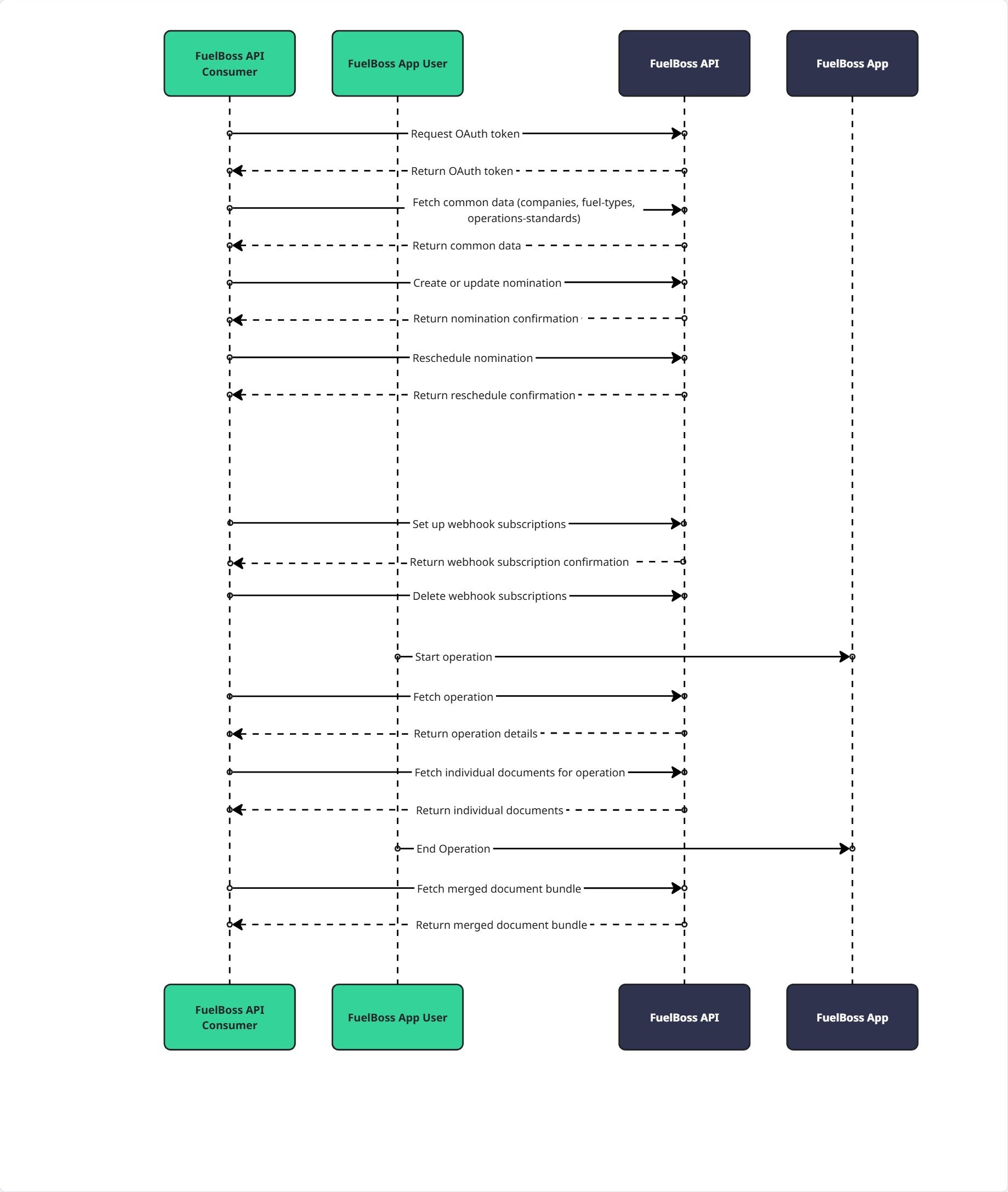
### API integration flow
The diagram below illustrates a typical integration sequence showing how your system authenticates, creates nominations, monitors operations, retrieves documents, and receives real-time updates via webhooks:
 ## Environments
The FuelBoss API is available in the following environments:
* **Production:** [https://api.fuelboss.net](https://api.fuelboss.net) - Live environment with real operational data
* **Demo:** [https://api.demo.fuelboss.net](https://api.demo.fuelboss.net) - Sandbox environment for testing and integration development
Interactive Swagger/OpenAPI documentation is available at `/swagger/index.html` for each environment to explore endpoints and view schemas.
Contact [itops@ofiniti.com](mailto:itops@ofiniti.com) for environment access and credentials.
## Authentication
The FuelBoss API uses OAuth 2.0 Client Credentials Grant for API authentication. This flow is designed for server-to-server communication where your system authenticates directly with our API.
### Getting access credentials
Contact FuelBoss [itops@ofiniti.com](mailto:itops@ofiniti.com) to receive your:
* `client_id` - Unique identifier for your company
* `client_secret` - Secret key for authentication (keep secure)
### Token request
**Endpoint:** `POST /oauth/token`
**Request Headers:**
```
Content-Type: application/x-www-form-urlencoded
```
**Request Body:**
```
grant_type=client_credentials&client_id=YOUR_CLIENT_ID&client_secret=YOUR_CLIENT_SECRET
```
**Success Response (200 OK):**
```json theme={null}
{
"access_token": "eyJhbGciOiJSUzI1NiIsInR5cCI6IkpXVCJ9...",
"token_type": "Bearer",
"expires_in": 3600
}
```
**Error Response (400 Bad Request):**
```json theme={null}
{
"error": "invalid_request",
"error_description": "grant_type is required"
}
```
### Using the access token
Include the access token in all API requests:
**Request Headers:**
```
Authorization: Bearer YOUR_ACCESS_TOKEN
```
**Token Lifecycle:**
* **Validity:** 60 minutes (3600 seconds)
* **Renewal:** Request new token before expiration
* **Scope:** Automatically limited to your company's data
## Conventions
All endpoints return JSON and require a valid access token unless otherwise specified.
This guide covers concepts and workflows. The API reference section of this tab documents every endpoint's request and response schema — including field-level descriptions and enumeration values — and includes an interactive playground.
### Date and time formats
All dates and times sent to the API must be in **ISO 8601 format with an explicit UTC offset** — a numeric offset such as `+08:00` or `-04:00`, or `Z` for UTC:
```
2026-07-06T14:00:00+08:00
2026-07-06T14:00:00-04:00
2026-07-06T14:00:00Z
```
The offset you send is honored as-is: the value is interpreted as an absolute instant and stored in UTC. Timestamps **without** an offset (e.g. `2026-07-06T14:00:00` or `2026-07-06`) are **rejected with `400 Bad Request`**.
Unless suffixed with `Utc`, dates and times returned by the API are expressed in the **local time zone of the bunkering port**, with the port's UTC offset included (e.g. `2026-07-06T14:00:00+02:00` for a port in CEST). Fields suffixed with `Utc` (e.g. `lastChangedAtUtc`) are always returned in UTC.
## Nominations
Nominations represent requests for bunkering operations. You identify a nomination by its `clientReference` — your unique identifier, at most 100 characters, alphanumeric and hyphens only (`a-z`, `A-Z`, `0-9`, `-`) — and the create-or-update endpoints are idempotent on it. All timestamps you send must include an explicit UTC offset — see [Date and time formats](#date-and-time-formats).
Create and update nominations through the endpoint matching your role: [as a supplier](/api-reference/nominations/creates-or-updates-a-nomination-as-a-supplier) (`PUT /v1/nominations/supplier`) or [as a receiver](/api-reference/nominations/creates-or-updates-a-nomination-as-a-receiver) (`PUT /v1/nominations/receiver`). As a receiver, your authenticated company is used as the receiver — the receiver section has no `companyIdentifier` — and you identify the supplier with `supplierCompanyIdentifier`; `supplierCompanyEntityReference` is only applied for loading operations where the receiver and supplier are the same company and is ignored otherwise. Field-level semantics for every request and response body are documented on the corresponding API reference page.
Draft nominations are lightweight, in-progress nominations: when [creating or updating a draft](/api-reference/nominations/creates-or-updates-a-draft-nomination) (`PUT /v1/nominations/drafts`), only `operationStandardCode`, `laycanStart`, and `laycanEnd` are mandatory, and everything else can be filled in later through subsequent upserts or directly in the FuelBoss web app. [Retrieving drafts](/api-reference/nominations/retrieves-draft-nominations) (`GET /v1/nominations/drafts`) is paginated with an opaque cursor (`cursor` and `limit` query parameters; default 50, maximum 200 per page).
`PATCH /v1/nominations/{clientReference}/schedule` ([reschedule](/api-reference/nominations/reschedules-an-existing-nomination-deprecated)) is deprecated. Use the create-or-update endpoints to change scheduling information instead: `delivery.estimatedTimeOfBunkering` and `delivery.estimatedBunkeringDurationInMinutes` cover rescheduling, and `supplier.assetIdentifier` covers supplier asset changes. The endpoint remains functional for backward compatibility but will be removed in a future version.
### Nominations with an asset operator
An **asset operator** is a company that manages bunkering assets (vessels or terminals) on behalf of another company. FuelBoss lets these relationships be modelled on a nomination so the operator can work on it. Use [Get Asset Operator Companies](/api-reference/common/retrieves-asset-operator-relationships-and-their-allowed-entities) to discover which relationships exist for your company and which company entities each relationship allows.
There are two directions, both driven by the supplier section of the [Create or Update Nomination (Supplier)](/api-reference/nominations/creates-or-updates-a-nomination-as-a-supplier) (`PUT /v1/nominations/supplier`) and [Create or Update Draft Nomination](/api-reference/nominations/creates-or-updates-a-draft-nomination) (`PUT /v1/nominations/drafts`) requests:
**1. You are the supplier and appoint an asset operator.** You create the nomination for your own company (leave `supplier.companyIdentifier` empty, or set it to your own company) and set `supplier.assetOperatorCompanyIdentifier` to a company you have appointed as your asset operator. That company then gains the ability to view and edit the nomination. The appointed company must appear in the `myAssetOperators` list returned by [Get Asset Operator Companies](/api-reference/common/retrieves-asset-operator-relationships-and-their-allowed-entities). If you also provide `supplier.companyEntityReference`, it must be one of the entities that relationship allows.
```json theme={null}
{
"supplier": {
"companyIdentifier": "COMP-123",
"assetOperatorCompanyIdentifier": "COMP-OPERATOR-1",
"companyEntityReference": "ENT-SUPPLIER-01"
}
}
```
**2. You act as the asset operator for another company.** You create the nomination on behalf of a company you operate assets for by setting `supplier.companyIdentifier` to that company and providing a `supplier.companyEntityReference` that the relationship allows. The supplier company you name must appear in the `companiesIAmOperatorFor` list returned by [Get Asset Operator Companies](/api-reference/common/retrieves-asset-operator-relationships-and-their-allowed-entities), and the `companyEntityReference` is **required** and must be one of that company's allowed entity references. Your own company is recorded as the asset operator; if you also send `assetOperatorCompanyIdentifier`, it must equal your own company identifier.
```json theme={null}
{
"supplier": {
"companyIdentifier": "COMP-SUPPLIER-2",
"companyEntityReference": "ENT-ALLOWED-07"
}
}
```
When a supplier company, asset operator company, or company entity reference cannot be resolved to an allowed relationship, the request is rejected with `422 Unprocessable Entity`.
## Entity management
Contracts and entities provide reference data you attach to nominations. Contracts can be referenced from nominations via the `contractReference` field in the nomination's delivery details.
[Contracts](/api-reference/entity-management/creates-or-updates-a-contract) are idempotent on `reference` (alphanumeric and hyphens only, at most 100 characters). A contract has a name, an optional external reference, an optional type (`term` or `spot`) and price type (`floating` or `fixed`), optional UTC start and end dates, and optional scoping lists: supplier entity references, port UN/LOCODEs, counterpart company identifiers, and counterpart entity references.
[Counterpart entities](/api-reference/entity-management/creates-or-updates-a-counterpart-entity) are also idempotent on `reference`. `email` must be a valid email address (at most 320 characters) and `phoneNumber` may contain only digits, spaces, and the characters `+ - ( )`. The returned shapes are documented on the [Get Company Entities](/api-reference/entity-management/retrieves-all-entities-available-for-your-company) and [Get Counterpart Entities](/api-reference/entity-management/retrieves-all-counterpart-entities-available-for-your-company) reference pages.
## Operations
Operations represent actual bunkering operations that have started or completed. [Retrieve an operation](/api-reference/operations/retrieves-a-specific-operation) with the same client reference that created the corresponding nomination — the response includes bunker delivery notes and document references.
Each entry in the operation's `documentReferences` array can be [retrieved individually](/api-reference/operations/retrieves-a-specific-document-file-for-an-operation) — the response body is the binary file, and the content type varies by document (PDF, JPEG, PNG). A [merged PDF of all documents](/api-reference/operations/retrieves-the-merged-documents-file-for-a-specific-operation) is available for operations signed using FuelBoss InBrowser™ signing.
## Webhooks
Webhooks allow you to receive real-time notifications about events in the FuelBoss system.
### Creating subscriptions
[Create a subscription](/api-reference/webhooks/creates-a-webhook-subscription) (`POST /v1/webhooks`) for the event types you list (see [CloudEvent types](#cloudevent-types) for the available values). A company can have at most 10 subscriptions, and the endpoint URL must use HTTPS.
* The `secret` field is optional but recommended: FuelBoss uses it to sign every delivery — see [Webhook security](#webhook-security).
* The `headers` field configures custom HTTP headers included in every delivery, useful for authenticating with API gateways such as Azure API Management (for example `Ocp-Apim-Subscription-Key`). At most 10 headers; keys up to 100 characters, values up to 1000 characters. The reserved names `X-Webhook-Signature`, `X-Event-Id`, `X-Event-Type`, `User-Agent`, and `Content-Type` cannot be used. Header values are write-only: responses return the configured names via `headerKeys` but never the values.
* Subscribe using the simple event type values (for example `nomination_cancelled`). Deliveries carry the full CloudEvents format in the `type` field (for example `net.fuelboss.nomination.cancelled`) — see [CloudEvent types](#cloudevent-types) for the mapping.
### Webhook delivery format
When events occur, FuelBoss sends POST requests to your registered webhook URLs using the CloudEvents v1.0 specification format. Each webhook delivery contains a CloudEvent envelope with standardized fields (`specversion`, `id`, `type`, `source`, `time`, `datacontenttype`) and the event-specific payload in the `data` field. The envelope, the request headers, and the payload of every event — including field-level descriptions and a realistic example — are documented on the [webhook event reference pages](/api-reference/webhook-events/nomination-created).
**Important Notes:**
* All webhook deliveries use POST method with `Content-Type: application/json`
* The `id` field identifies the event: retries of the same event carry the same `id`, so use it for idempotency checking
* The `type` field uses CloudEvents format. See [CloudEvent Types](#cloudevent-types) for the mapping between subscription values and delivery type strings
* Field names inside the `data` payload are PascalCase (for example `ClientReference`), unlike the camelCase field names used by the REST API endpoints
* Timestamps are always in ISO 8601 format with UTC timezone
* Your webhook endpoint must respond with 2xx status code within 10 seconds
* Failed deliveries are retried with exponential backoff for up to 24 hours
* Any custom headers configured on the subscription are included in every webhook delivery alongside the standard headers
* Webhook deliveries originate from fixed IP addresses per environment. If your firewall or API gateway requires IP allowlisting, use the following addresses:
* **Production:** `72.144.19.232`
* **Demo:** `9.141.22.123`
***
### CloudEvent types
Mapping between webhook subscription event types and CloudEvent delivery type strings:
| Subscription Value (when creating webhook) | CloudEvent Type (in delivery `type` field) | Description |
| --------------------------------------------------------------------------------------------------------- | ------------------------------------------------------ | ---------------------------------------------------------------------------------- |
| [nomination\_created](/api-reference/webhook-events/nomination-created) | net.fuelboss.nomination.created | Nomination has been created |
| [nomination\_cancelled](/api-reference/webhook-events/nomination-cancelled) | net.fuelboss.nomination.cancelled | Nomination has been cancelled |
| [nomination\_bunkering\_location\_changed](/api-reference/webhook-events/bunkering-location-changed) | net.fuelboss.nomination.bunkering\_location.changed | Nomination bunkering location has changed |
| [nomination\_fuel\_specification\_changed](/api-reference/webhook-events/fuel-specification-changed) | net.fuelboss.nomination.fuel\_specification.changed | Nomination fuel specification has changed |
| [nomination\_receiver\_vessel\_changed](/api-reference/webhook-events/receiver-vessel-changed) | net.fuelboss.nomination.receiver\_vessel.changed | Nomination receiver vessel has changed |
| [nomination\_supplier\_asset\_changed](/api-reference/webhook-events/supplier-asset-changed) | net.fuelboss.nomination.supplier\_asset.changed | Nomination supplier asset has changed |
| [nomination\_bunkering\_start\_time\_changed](/api-reference/webhook-events/bunkering-start-time-changed) | net.fuelboss.nomination.bunkering\_start\_time.changed | Nomination estimated bunkering start time (BST) has changed |
| [nomination\_bunkering\_end\_time\_changed](/api-reference/webhook-events/bunkering-end-time-changed) | net.fuelboss.nomination.bunkering\_end\_time.changed | Nomination estimated bunkering end time (estimated time of completion) has changed |
| [nomination\_contract\_changed](/api-reference/webhook-events/contract-changed) | net.fuelboss.nomination.contract.changed | Nomination contract has changed |
| [nomination\_company\_entity\_changed](/api-reference/webhook-events/company-entity-changed) | net.fuelboss.nomination.company\_entity.changed | Nomination supplier company entity has changed |
| [nomination\_counterpart\_entity\_changed](/api-reference/webhook-events/counterpart-entity-changed) | net.fuelboss.nomination.counterpart\_entity.changed | Nomination counterpart entity has changed |
| [nomination\_draft\_upserted](/api-reference/webhook-events/draft-nomination-upserted) | net.fuelboss.nomination.draft.upserted | Draft nomination has been created or updated |
| [operation\_started](/api-reference/webhook-events/operation-started) | net.fuelboss.operation.started | Bunkering operation has started |
| [operation\_ended](/api-reference/webhook-events/operation-ended) | net.fuelboss.operation.ended | Bunkering operation has ended |
**Note:** When creating webhook subscriptions, use the simple subscription values (left column). When processing webhook deliveries, parse the CloudEvent type strings (middle column) from the `type` field. Each subscription value links to the reference page documenting that event's delivery, envelope, and payload.
***
### Webhook security
#### Signature verification
When creating a webhook subscription with a `secret`, FuelBoss signs each webhook delivery with HMAC-SHA256. The signature is included in the `X-Webhook-Signature` header as a Base64-encoded string.
**To verify a webhook delivery:**
1. Extract the `X-Webhook-Signature` header value
2. Compute HMAC-SHA256 of the raw request body using your secret
3. Base64-encode the computed hash
4. Compare the computed signature with the header value (use constant-time comparison)
#### Best practices
* Always use HTTPS URLs for webhook endpoints
* Verify webhook signatures to ensure authenticity
* Use the CloudEvent `id` field for idempotency to handle duplicate deliveries
* Respond with 2xx status code quickly (under 10 seconds)
* Process webhook payloads asynchronously if needed
* Log webhook deliveries for debugging and audit purposes
* Implement exponential backoff if you need to retry processing
* Configure firewall or API gateway IP allowlisting for webhook source IPs (see [Webhook Delivery Format](#webhook-delivery-format))
## Error handling
### HTTP status codes
| Code | Description |
| ---- | -------------------------------------------------------------------------------------- |
| 200 | Success |
| 201 | Created - Resource successfully created |
| 204 | No Content - Resource successfully deleted |
| 400 | Bad Request - Invalid request format (e.g. a timestamp missing an explicit UTC offset) |
| 401 | Unauthorized - Invalid or expired token |
| 403 | Forbidden - Insufficient permissions |
| 404 | Not Found - Resource does not exist |
| 409 | Conflict - Resource conflict (e.g., duplicate) |
| 422 | Unprocessable Entity - Valid format but fails business validation |
| 429 | Too Many Requests - Rate limit exceeded |
| 500 | Internal Server Error - Contact support |
### Error response format
**ProblemDetails Response:**
All error responses use the RFC 9457 (Problem Details for HTTP APIs) format with the following fields:
| Field | Type | Description |
| --------- | ----------------- | -------------------------------------------------------------- |
| type | string | URI reference identifying the problem type |
| title | string | Short, human-readable summary of the problem type |
| status | number | HTTP status code |
| detail | string | Human-readable explanation specific to this occurrence |
| instance | string | URI identifying the specific API instance |
| errors | object | Validation errors by field name (only for validation failures) |
| timestamp | string (ISO 8601) | When the error occurred in UTC |
| trace\_id | string | Request identifier for tracing and correlation |
**Example - Validation Error (422):**
```json theme={null}
{
"type": "https://tools.ietf.org/html/rfc9110#section-15.5.23",
"title": "Unprocessable Content",
"status": 422,
"detail": "One or more validation errors occurred in the request.",
"instance": "/v1/nominations/supplier",
"errors": {
"ClientReference": ["The ClientReference field is required."],
"FuelSpecifications": ["At least one fuel specification is required."]
},
"timestamp": "2026-03-10T12:34:56Z",
"trace_id": "00-abc123-def456-00"
}
```
**Example - Timestamp Without UTC Offset (400):**
```json theme={null}
{
"type": "https://tools.ietf.org/html/rfc9110#section-15.5.1",
"title": "Bad Request",
"status": 400,
"detail": "The timestamp '2026-07-06T14:00:00' must include an explicit UTC offset, for example '2026-07-06T14:00:00+02:00', '2026-07-06T14:00:00-04:00', or '2026-07-06T14:00:00Z'.",
"instance": "/v1/nominations/supplier",
"timestamp": "2026-03-10T12:34:56Z",
"trace_id": "00-abc123-def456-00"
}
```
**Example - Not Found (404):**
```json theme={null}
{
"type": "https://tools.ietf.org/html/rfc9110#section-15.5.5",
"title": "Not Found",
"status": 404,
"detail": "Nomination with client reference 'NOM-2025-999' was not found.",
"instance": "/v1/nominations/NOM-2025-999",
"timestamp": "2026-03-10T12:34:56Z",
"trace_id": "00-abc123-def456-00"
}
```
**Example - Internal Server Error (500):**
```json theme={null}
{
"type": "https://tools.ietf.org/html/rfc9110#section-15.6.1",
"title": "Internal Server Error",
"status": 500,
"detail": "An unexpected error occurred",
"instance": "/v1/nominations/supplier",
"timestamp": "2026-03-10T12:34:56Z",
"trace_id": "00-abc123-def456-00"
}
```
## Rate limiting
**Limits:**
* **Rate:** 100 requests per minute per `client_id`
* **Window:** Rolling 60-second window
* **Scope:** Applied per company credentials
**Rate Limit Headers:**
All responses include rate limiting information:
```
X-RateLimit-Limit: 100
X-RateLimit-Remaining: 95
X-RateLimit-Reset: 1730293200
```
**Rate Limit Exceeded Response (429):**
```json theme={null}
{
"type": "https://httpstatuses.com/429",
"title": "Too Many Requests",
"status": 429,
"detail": "Rate limit exceeded. Please retry after 60 seconds.",
"traceId": "00-abc123-def456-00"
}
```
## Security and compliance
### Transport security
* **TLS/HTTPS Only:** All communication must use HTTPS
* **Certificate Validation:** Verify SSL certificates
* **Token Security:** Store client credentials securely (never in source code or client-side applications)
### Audit logging
FuelBoss logs all API requests for security and compliance:
* Timestamp of request
* Client ID and Company ID
* Endpoint accessed and HTTP method
* Response status code and response time
* IP address and user agent
### Data access
* **Company Isolation:** API responses limited to your company's data only
* **No Cross-Company Access:** Cannot access other companies' information
* **Data Retention:** Audit logs retained per compliance requirements
### Webhook security
When configuring webhooks:
* Use HTTPS endpoints only
* Provide a `secret` for HMAC signature verification
* Verify webhook signatures on your server
* Implement idempotency to handle duplicate deliveries
* Allowlist webhook source IP addresses in your firewall (see [Webhook Delivery Format](#webhook-delivery-format))
## Versioning
### Version strategy
* **Current Version:** 1.0 (accessible via `/v1` URL prefix)
* **URL Format:** `https://api.fuelboss.net/v1/...`
* **Semantic Versioning:** Non-breaking changes will be added to v1
* **Breaking Changes:** Will result in new major version (`/v2`, `/v3`, etc.)
### Version lifecycle
* **Support Period:** Minimum 6 months for previous version
* **Deprecation Notice:** 3 months advance notice before deprecation
* **Migration:** Migration guides provided for breaking changes
For the history of changes in each release, see the [changelog](/fuelboss/changelog).
## Support
### Technical support
* **Email:** [itops@ofiniti.com](mailto:itops@ofiniti.com)
* **Response Time:**
* General inquiries: 24 hours
* Critical issues: 4 hours
### Monitoring and status
* **Planned Maintenance:** 48-hour advance notice via email
* **Incident Communication:** Subscribe via our status page (email, Slack, Microsoft Teams, or RSS)
* **API Status:** Monitor via our status page at [https://ofiniti.statuspage.io/](https://ofiniti.statuspage.io/) (machine-readable JSON at `https://ofiniti.statuspage.io/api/v2/summary.json`); subscribe there for incident and degradation notifications
## Environments
The FuelBoss API is available in the following environments:
* **Production:** [https://api.fuelboss.net](https://api.fuelboss.net) - Live environment with real operational data
* **Demo:** [https://api.demo.fuelboss.net](https://api.demo.fuelboss.net) - Sandbox environment for testing and integration development
Interactive Swagger/OpenAPI documentation is available at `/swagger/index.html` for each environment to explore endpoints and view schemas.
Contact [itops@ofiniti.com](mailto:itops@ofiniti.com) for environment access and credentials.
## Authentication
The FuelBoss API uses OAuth 2.0 Client Credentials Grant for API authentication. This flow is designed for server-to-server communication where your system authenticates directly with our API.
### Getting access credentials
Contact FuelBoss [itops@ofiniti.com](mailto:itops@ofiniti.com) to receive your:
* `client_id` - Unique identifier for your company
* `client_secret` - Secret key for authentication (keep secure)
### Token request
**Endpoint:** `POST /oauth/token`
**Request Headers:**
```
Content-Type: application/x-www-form-urlencoded
```
**Request Body:**
```
grant_type=client_credentials&client_id=YOUR_CLIENT_ID&client_secret=YOUR_CLIENT_SECRET
```
**Success Response (200 OK):**
```json theme={null}
{
"access_token": "eyJhbGciOiJSUzI1NiIsInR5cCI6IkpXVCJ9...",
"token_type": "Bearer",
"expires_in": 3600
}
```
**Error Response (400 Bad Request):**
```json theme={null}
{
"error": "invalid_request",
"error_description": "grant_type is required"
}
```
### Using the access token
Include the access token in all API requests:
**Request Headers:**
```
Authorization: Bearer YOUR_ACCESS_TOKEN
```
**Token Lifecycle:**
* **Validity:** 60 minutes (3600 seconds)
* **Renewal:** Request new token before expiration
* **Scope:** Automatically limited to your company's data
## Conventions
All endpoints return JSON and require a valid access token unless otherwise specified.
This guide covers concepts and workflows. The API reference section of this tab documents every endpoint's request and response schema — including field-level descriptions and enumeration values — and includes an interactive playground.
### Date and time formats
All dates and times sent to the API must be in **ISO 8601 format with an explicit UTC offset** — a numeric offset such as `+08:00` or `-04:00`, or `Z` for UTC:
```
2026-07-06T14:00:00+08:00
2026-07-06T14:00:00-04:00
2026-07-06T14:00:00Z
```
The offset you send is honored as-is: the value is interpreted as an absolute instant and stored in UTC. Timestamps **without** an offset (e.g. `2026-07-06T14:00:00` or `2026-07-06`) are **rejected with `400 Bad Request`**.
Unless suffixed with `Utc`, dates and times returned by the API are expressed in the **local time zone of the bunkering port**, with the port's UTC offset included (e.g. `2026-07-06T14:00:00+02:00` for a port in CEST). Fields suffixed with `Utc` (e.g. `lastChangedAtUtc`) are always returned in UTC.
## Nominations
Nominations represent requests for bunkering operations. You identify a nomination by its `clientReference` — your unique identifier, at most 100 characters, alphanumeric and hyphens only (`a-z`, `A-Z`, `0-9`, `-`) — and the create-or-update endpoints are idempotent on it. All timestamps you send must include an explicit UTC offset — see [Date and time formats](#date-and-time-formats).
Create and update nominations through the endpoint matching your role: [as a supplier](/api-reference/nominations/creates-or-updates-a-nomination-as-a-supplier) (`PUT /v1/nominations/supplier`) or [as a receiver](/api-reference/nominations/creates-or-updates-a-nomination-as-a-receiver) (`PUT /v1/nominations/receiver`). As a receiver, your authenticated company is used as the receiver — the receiver section has no `companyIdentifier` — and you identify the supplier with `supplierCompanyIdentifier`; `supplierCompanyEntityReference` is only applied for loading operations where the receiver and supplier are the same company and is ignored otherwise. Field-level semantics for every request and response body are documented on the corresponding API reference page.
Draft nominations are lightweight, in-progress nominations: when [creating or updating a draft](/api-reference/nominations/creates-or-updates-a-draft-nomination) (`PUT /v1/nominations/drafts`), only `operationStandardCode`, `laycanStart`, and `laycanEnd` are mandatory, and everything else can be filled in later through subsequent upserts or directly in the FuelBoss web app. [Retrieving drafts](/api-reference/nominations/retrieves-draft-nominations) (`GET /v1/nominations/drafts`) is paginated with an opaque cursor (`cursor` and `limit` query parameters; default 50, maximum 200 per page).
`PATCH /v1/nominations/{clientReference}/schedule` ([reschedule](/api-reference/nominations/reschedules-an-existing-nomination-deprecated)) is deprecated. Use the create-or-update endpoints to change scheduling information instead: `delivery.estimatedTimeOfBunkering` and `delivery.estimatedBunkeringDurationInMinutes` cover rescheduling, and `supplier.assetIdentifier` covers supplier asset changes. The endpoint remains functional for backward compatibility but will be removed in a future version.
### Nominations with an asset operator
An **asset operator** is a company that manages bunkering assets (vessels or terminals) on behalf of another company. FuelBoss lets these relationships be modelled on a nomination so the operator can work on it. Use [Get Asset Operator Companies](/api-reference/common/retrieves-asset-operator-relationships-and-their-allowed-entities) to discover which relationships exist for your company and which company entities each relationship allows.
There are two directions, both driven by the supplier section of the [Create or Update Nomination (Supplier)](/api-reference/nominations/creates-or-updates-a-nomination-as-a-supplier) (`PUT /v1/nominations/supplier`) and [Create or Update Draft Nomination](/api-reference/nominations/creates-or-updates-a-draft-nomination) (`PUT /v1/nominations/drafts`) requests:
**1. You are the supplier and appoint an asset operator.** You create the nomination for your own company (leave `supplier.companyIdentifier` empty, or set it to your own company) and set `supplier.assetOperatorCompanyIdentifier` to a company you have appointed as your asset operator. That company then gains the ability to view and edit the nomination. The appointed company must appear in the `myAssetOperators` list returned by [Get Asset Operator Companies](/api-reference/common/retrieves-asset-operator-relationships-and-their-allowed-entities). If you also provide `supplier.companyEntityReference`, it must be one of the entities that relationship allows.
```json theme={null}
{
"supplier": {
"companyIdentifier": "COMP-123",
"assetOperatorCompanyIdentifier": "COMP-OPERATOR-1",
"companyEntityReference": "ENT-SUPPLIER-01"
}
}
```
**2. You act as the asset operator for another company.** You create the nomination on behalf of a company you operate assets for by setting `supplier.companyIdentifier` to that company and providing a `supplier.companyEntityReference` that the relationship allows. The supplier company you name must appear in the `companiesIAmOperatorFor` list returned by [Get Asset Operator Companies](/api-reference/common/retrieves-asset-operator-relationships-and-their-allowed-entities), and the `companyEntityReference` is **required** and must be one of that company's allowed entity references. Your own company is recorded as the asset operator; if you also send `assetOperatorCompanyIdentifier`, it must equal your own company identifier.
```json theme={null}
{
"supplier": {
"companyIdentifier": "COMP-SUPPLIER-2",
"companyEntityReference": "ENT-ALLOWED-07"
}
}
```
When a supplier company, asset operator company, or company entity reference cannot be resolved to an allowed relationship, the request is rejected with `422 Unprocessable Entity`.
## Entity management
Contracts and entities provide reference data you attach to nominations. Contracts can be referenced from nominations via the `contractReference` field in the nomination's delivery details.
[Contracts](/api-reference/entity-management/creates-or-updates-a-contract) are idempotent on `reference` (alphanumeric and hyphens only, at most 100 characters). A contract has a name, an optional external reference, an optional type (`term` or `spot`) and price type (`floating` or `fixed`), optional UTC start and end dates, and optional scoping lists: supplier entity references, port UN/LOCODEs, counterpart company identifiers, and counterpart entity references.
[Counterpart entities](/api-reference/entity-management/creates-or-updates-a-counterpart-entity) are also idempotent on `reference`. `email` must be a valid email address (at most 320 characters) and `phoneNumber` may contain only digits, spaces, and the characters `+ - ( )`. The returned shapes are documented on the [Get Company Entities](/api-reference/entity-management/retrieves-all-entities-available-for-your-company) and [Get Counterpart Entities](/api-reference/entity-management/retrieves-all-counterpart-entities-available-for-your-company) reference pages.
## Operations
Operations represent actual bunkering operations that have started or completed. [Retrieve an operation](/api-reference/operations/retrieves-a-specific-operation) with the same client reference that created the corresponding nomination — the response includes bunker delivery notes and document references.
Each entry in the operation's `documentReferences` array can be [retrieved individually](/api-reference/operations/retrieves-a-specific-document-file-for-an-operation) — the response body is the binary file, and the content type varies by document (PDF, JPEG, PNG). A [merged PDF of all documents](/api-reference/operations/retrieves-the-merged-documents-file-for-a-specific-operation) is available for operations signed using FuelBoss InBrowser™ signing.
## Webhooks
Webhooks allow you to receive real-time notifications about events in the FuelBoss system.
### Creating subscriptions
[Create a subscription](/api-reference/webhooks/creates-a-webhook-subscription) (`POST /v1/webhooks`) for the event types you list (see [CloudEvent types](#cloudevent-types) for the available values). A company can have at most 10 subscriptions, and the endpoint URL must use HTTPS.
* The `secret` field is optional but recommended: FuelBoss uses it to sign every delivery — see [Webhook security](#webhook-security).
* The `headers` field configures custom HTTP headers included in every delivery, useful for authenticating with API gateways such as Azure API Management (for example `Ocp-Apim-Subscription-Key`). At most 10 headers; keys up to 100 characters, values up to 1000 characters. The reserved names `X-Webhook-Signature`, `X-Event-Id`, `X-Event-Type`, `User-Agent`, and `Content-Type` cannot be used. Header values are write-only: responses return the configured names via `headerKeys` but never the values.
* Subscribe using the simple event type values (for example `nomination_cancelled`). Deliveries carry the full CloudEvents format in the `type` field (for example `net.fuelboss.nomination.cancelled`) — see [CloudEvent types](#cloudevent-types) for the mapping.
### Webhook delivery format
When events occur, FuelBoss sends POST requests to your registered webhook URLs using the CloudEvents v1.0 specification format. Each webhook delivery contains a CloudEvent envelope with standardized fields (`specversion`, `id`, `type`, `source`, `time`, `datacontenttype`) and the event-specific payload in the `data` field. The envelope, the request headers, and the payload of every event — including field-level descriptions and a realistic example — are documented on the [webhook event reference pages](/api-reference/webhook-events/nomination-created).
**Important Notes:**
* All webhook deliveries use POST method with `Content-Type: application/json`
* The `id` field identifies the event: retries of the same event carry the same `id`, so use it for idempotency checking
* The `type` field uses CloudEvents format. See [CloudEvent Types](#cloudevent-types) for the mapping between subscription values and delivery type strings
* Field names inside the `data` payload are PascalCase (for example `ClientReference`), unlike the camelCase field names used by the REST API endpoints
* Timestamps are always in ISO 8601 format with UTC timezone
* Your webhook endpoint must respond with 2xx status code within 10 seconds
* Failed deliveries are retried with exponential backoff for up to 24 hours
* Any custom headers configured on the subscription are included in every webhook delivery alongside the standard headers
* Webhook deliveries originate from fixed IP addresses per environment. If your firewall or API gateway requires IP allowlisting, use the following addresses:
* **Production:** `72.144.19.232`
* **Demo:** `9.141.22.123`
***
### CloudEvent types
Mapping between webhook subscription event types and CloudEvent delivery type strings:
| Subscription Value (when creating webhook) | CloudEvent Type (in delivery `type` field) | Description |
| --------------------------------------------------------------------------------------------------------- | ------------------------------------------------------ | ---------------------------------------------------------------------------------- |
| [nomination\_created](/api-reference/webhook-events/nomination-created) | net.fuelboss.nomination.created | Nomination has been created |
| [nomination\_cancelled](/api-reference/webhook-events/nomination-cancelled) | net.fuelboss.nomination.cancelled | Nomination has been cancelled |
| [nomination\_bunkering\_location\_changed](/api-reference/webhook-events/bunkering-location-changed) | net.fuelboss.nomination.bunkering\_location.changed | Nomination bunkering location has changed |
| [nomination\_fuel\_specification\_changed](/api-reference/webhook-events/fuel-specification-changed) | net.fuelboss.nomination.fuel\_specification.changed | Nomination fuel specification has changed |
| [nomination\_receiver\_vessel\_changed](/api-reference/webhook-events/receiver-vessel-changed) | net.fuelboss.nomination.receiver\_vessel.changed | Nomination receiver vessel has changed |
| [nomination\_supplier\_asset\_changed](/api-reference/webhook-events/supplier-asset-changed) | net.fuelboss.nomination.supplier\_asset.changed | Nomination supplier asset has changed |
| [nomination\_bunkering\_start\_time\_changed](/api-reference/webhook-events/bunkering-start-time-changed) | net.fuelboss.nomination.bunkering\_start\_time.changed | Nomination estimated bunkering start time (BST) has changed |
| [nomination\_bunkering\_end\_time\_changed](/api-reference/webhook-events/bunkering-end-time-changed) | net.fuelboss.nomination.bunkering\_end\_time.changed | Nomination estimated bunkering end time (estimated time of completion) has changed |
| [nomination\_contract\_changed](/api-reference/webhook-events/contract-changed) | net.fuelboss.nomination.contract.changed | Nomination contract has changed |
| [nomination\_company\_entity\_changed](/api-reference/webhook-events/company-entity-changed) | net.fuelboss.nomination.company\_entity.changed | Nomination supplier company entity has changed |
| [nomination\_counterpart\_entity\_changed](/api-reference/webhook-events/counterpart-entity-changed) | net.fuelboss.nomination.counterpart\_entity.changed | Nomination counterpart entity has changed |
| [nomination\_draft\_upserted](/api-reference/webhook-events/draft-nomination-upserted) | net.fuelboss.nomination.draft.upserted | Draft nomination has been created or updated |
| [operation\_started](/api-reference/webhook-events/operation-started) | net.fuelboss.operation.started | Bunkering operation has started |
| [operation\_ended](/api-reference/webhook-events/operation-ended) | net.fuelboss.operation.ended | Bunkering operation has ended |
**Note:** When creating webhook subscriptions, use the simple subscription values (left column). When processing webhook deliveries, parse the CloudEvent type strings (middle column) from the `type` field. Each subscription value links to the reference page documenting that event's delivery, envelope, and payload.
***
### Webhook security
#### Signature verification
When creating a webhook subscription with a `secret`, FuelBoss signs each webhook delivery with HMAC-SHA256. The signature is included in the `X-Webhook-Signature` header as a Base64-encoded string.
**To verify a webhook delivery:**
1. Extract the `X-Webhook-Signature` header value
2. Compute HMAC-SHA256 of the raw request body using your secret
3. Base64-encode the computed hash
4. Compare the computed signature with the header value (use constant-time comparison)
#### Best practices
* Always use HTTPS URLs for webhook endpoints
* Verify webhook signatures to ensure authenticity
* Use the CloudEvent `id` field for idempotency to handle duplicate deliveries
* Respond with 2xx status code quickly (under 10 seconds)
* Process webhook payloads asynchronously if needed
* Log webhook deliveries for debugging and audit purposes
* Implement exponential backoff if you need to retry processing
* Configure firewall or API gateway IP allowlisting for webhook source IPs (see [Webhook Delivery Format](#webhook-delivery-format))
## Error handling
### HTTP status codes
| Code | Description |
| ---- | -------------------------------------------------------------------------------------- |
| 200 | Success |
| 201 | Created - Resource successfully created |
| 204 | No Content - Resource successfully deleted |
| 400 | Bad Request - Invalid request format (e.g. a timestamp missing an explicit UTC offset) |
| 401 | Unauthorized - Invalid or expired token |
| 403 | Forbidden - Insufficient permissions |
| 404 | Not Found - Resource does not exist |
| 409 | Conflict - Resource conflict (e.g., duplicate) |
| 422 | Unprocessable Entity - Valid format but fails business validation |
| 429 | Too Many Requests - Rate limit exceeded |
| 500 | Internal Server Error - Contact support |
### Error response format
**ProblemDetails Response:**
All error responses use the RFC 9457 (Problem Details for HTTP APIs) format with the following fields:
| Field | Type | Description |
| --------- | ----------------- | -------------------------------------------------------------- |
| type | string | URI reference identifying the problem type |
| title | string | Short, human-readable summary of the problem type |
| status | number | HTTP status code |
| detail | string | Human-readable explanation specific to this occurrence |
| instance | string | URI identifying the specific API instance |
| errors | object | Validation errors by field name (only for validation failures) |
| timestamp | string (ISO 8601) | When the error occurred in UTC |
| trace\_id | string | Request identifier for tracing and correlation |
**Example - Validation Error (422):**
```json theme={null}
{
"type": "https://tools.ietf.org/html/rfc9110#section-15.5.23",
"title": "Unprocessable Content",
"status": 422,
"detail": "One or more validation errors occurred in the request.",
"instance": "/v1/nominations/supplier",
"errors": {
"ClientReference": ["The ClientReference field is required."],
"FuelSpecifications": ["At least one fuel specification is required."]
},
"timestamp": "2026-03-10T12:34:56Z",
"trace_id": "00-abc123-def456-00"
}
```
**Example - Timestamp Without UTC Offset (400):**
```json theme={null}
{
"type": "https://tools.ietf.org/html/rfc9110#section-15.5.1",
"title": "Bad Request",
"status": 400,
"detail": "The timestamp '2026-07-06T14:00:00' must include an explicit UTC offset, for example '2026-07-06T14:00:00+02:00', '2026-07-06T14:00:00-04:00', or '2026-07-06T14:00:00Z'.",
"instance": "/v1/nominations/supplier",
"timestamp": "2026-03-10T12:34:56Z",
"trace_id": "00-abc123-def456-00"
}
```
**Example - Not Found (404):**
```json theme={null}
{
"type": "https://tools.ietf.org/html/rfc9110#section-15.5.5",
"title": "Not Found",
"status": 404,
"detail": "Nomination with client reference 'NOM-2025-999' was not found.",
"instance": "/v1/nominations/NOM-2025-999",
"timestamp": "2026-03-10T12:34:56Z",
"trace_id": "00-abc123-def456-00"
}
```
**Example - Internal Server Error (500):**
```json theme={null}
{
"type": "https://tools.ietf.org/html/rfc9110#section-15.6.1",
"title": "Internal Server Error",
"status": 500,
"detail": "An unexpected error occurred",
"instance": "/v1/nominations/supplier",
"timestamp": "2026-03-10T12:34:56Z",
"trace_id": "00-abc123-def456-00"
}
```
## Rate limiting
**Limits:**
* **Rate:** 100 requests per minute per `client_id`
* **Window:** Rolling 60-second window
* **Scope:** Applied per company credentials
**Rate Limit Headers:**
All responses include rate limiting information:
```
X-RateLimit-Limit: 100
X-RateLimit-Remaining: 95
X-RateLimit-Reset: 1730293200
```
**Rate Limit Exceeded Response (429):**
```json theme={null}
{
"type": "https://httpstatuses.com/429",
"title": "Too Many Requests",
"status": 429,
"detail": "Rate limit exceeded. Please retry after 60 seconds.",
"traceId": "00-abc123-def456-00"
}
```
## Security and compliance
### Transport security
* **TLS/HTTPS Only:** All communication must use HTTPS
* **Certificate Validation:** Verify SSL certificates
* **Token Security:** Store client credentials securely (never in source code or client-side applications)
### Audit logging
FuelBoss logs all API requests for security and compliance:
* Timestamp of request
* Client ID and Company ID
* Endpoint accessed and HTTP method
* Response status code and response time
* IP address and user agent
### Data access
* **Company Isolation:** API responses limited to your company's data only
* **No Cross-Company Access:** Cannot access other companies' information
* **Data Retention:** Audit logs retained per compliance requirements
### Webhook security
When configuring webhooks:
* Use HTTPS endpoints only
* Provide a `secret` for HMAC signature verification
* Verify webhook signatures on your server
* Implement idempotency to handle duplicate deliveries
* Allowlist webhook source IP addresses in your firewall (see [Webhook Delivery Format](#webhook-delivery-format))
## Versioning
### Version strategy
* **Current Version:** 1.0 (accessible via `/v1` URL prefix)
* **URL Format:** `https://api.fuelboss.net/v1/...`
* **Semantic Versioning:** Non-breaking changes will be added to v1
* **Breaking Changes:** Will result in new major version (`/v2`, `/v3`, etc.)
### Version lifecycle
* **Support Period:** Minimum 6 months for previous version
* **Deprecation Notice:** 3 months advance notice before deprecation
* **Migration:** Migration guides provided for breaking changes
For the history of changes in each release, see the [changelog](/fuelboss/changelog).
## Support
### Technical support
* **Email:** [itops@ofiniti.com](mailto:itops@ofiniti.com)
* **Response Time:**
* General inquiries: 24 hours
* Critical issues: 4 hours
### Monitoring and status
* **Planned Maintenance:** 48-hour advance notice via email
* **Incident Communication:** Subscribe via our status page (email, Slack, Microsoft Teams, or RSS)
* **API Status:** Monitor via our status page at [https://ofiniti.statuspage.io/](https://ofiniti.statuspage.io/) (machine-readable JSON at `https://ofiniti.statuspage.io/api/v2/summary.json`); subscribe there for incident and degradation notifications